The ability to auto log calls or share pending calls between users assigned to those numbers so our admins can clear them out would be really helpful.
We have reps that forget to log calls that are not answered, and we don’t have the ability to see those calls.
1 Like
Hello James
Thanks for sharing this! We completely understand how important it is to have better visibility and accountability for missed or unlogged calls especially when multiple users are handling the same number.
Just to share a quick tip: if you have admin-level access or access to Setup > Calling and Texting > Call Logs, you can view all calls (including missed ones).
That said, the idea of auto-logging calls or enabling pending call sharing among assigned users is definitely valuable.
We’ve noted this as a feature request and will discuss it with the product team for possible enhancement.
Appreciate you bringing this up—please keep the suggestions coming!
I also think it is important to have Admin level users view all calls (Full company call logs/ missed calls/ and pending) within the calling button at the top of the screen.
I see your work around in the Setup section, which I did not know of, however this is not a location that is frequently viewed.
Not having full visibility for Admin users is a problem!!
1 Like
Hi Shawn,
Thanks for raising this, you make a great point.
Full visibility into all call activity from the top-level calling button would definitely be a valuable improvement for Admin users. While the current workaround in the Setup section provides access, I agree that it’s not the most intuitive or frequently visited location for quick oversight.
I’ve shared your feedback with our product team and highlighted the importance of surfacing this data more prominently for Admins. Improving accessibility and transparency is a priority, and your input helps us identify where to focus next.
Really appreciate you taking the time to share this!
I completely agree—this is a major pain point and needs to be a top priority. Also, all call data should live in one clear, accessible spot, not tucked away in hidden or unrelated menus. The current workaround just highlights the flawed design. Please listen to customer feedback and roll out a proper auto-log and shared pending-call solution ASAP.
2 Likes
Hello there,
Your requirements make complete sense, and this enhancement would be beneficial for many users. We’ve already shared the request with our product team, and it’s currently under evaluation, as it needs to go through multiple stages before a feature can be developed.
We will keep you updated as soon as we have any significant progress from the product team.
1 Like
Is there any update to this? Auto-logging calls would be a significant improvement. I work out in the field so especially on the mobile app when you are returning multiple calls logging each one seldom happens
Hello there,
We’ve shared it with our product team, and it is currently under evaluation, as it needs to go through multiple stages before a feature can be developed.
We’ll keep you updated as soon as there’s any significant progress from the product team.
In the meantime, you can use the existing reports on the dashboard as a workaround:
-
Call Logs: View your call logs and recordings.
-
Call Outcomes: Track different call outcomes during a selected time.
-
Call Sentiment Analysis by Platform: Analyze positive, negative, or neutral call sentiments for each platform.
-
Call Summary Report: See the number of calls and time spent by each user.
-
Call Transcription Summary: Get key metrics and insights for each call.
-
Calls by Day: Track the number of calls made daily by users.
All reports can be added to your dashboard for easy access and monitoring.
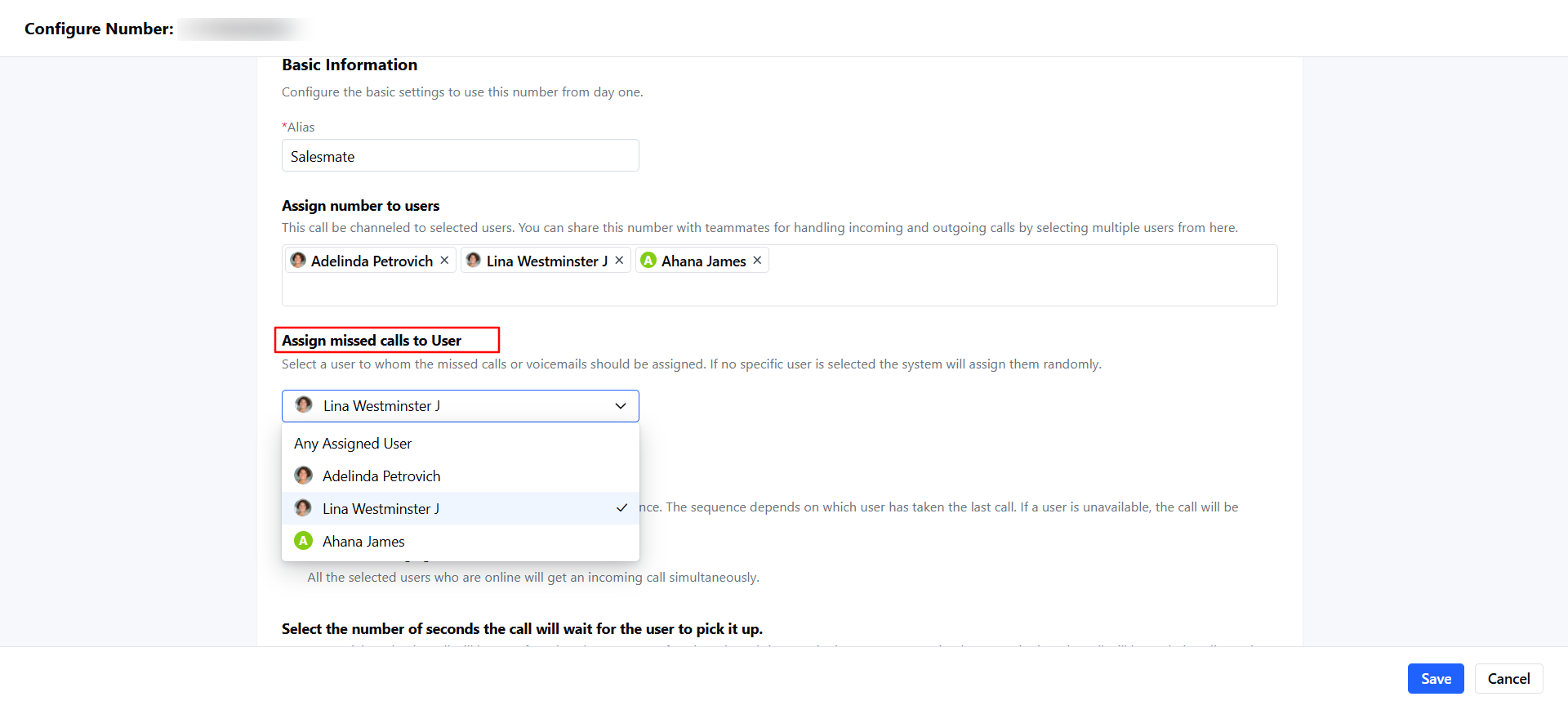
Also, we have an update: If a user misses a call, you now have the option to assign the missed call to a specific user.
To do this:
-
Go to Voice and Text.
-
Hover over the number and click Actions > Edit.
-
Scroll to Assign Missed Calls to User.
-
Select the user to whom missed calls or voicemails should be assigned.
If no specific user is selected, the system will assign them randomly.
Best regards,
Shreya